
How do I manage Status List in Aircraft Centre?
| 1. Login to your account using the username and password provided. | |
| 2. Hover over the Fleet Management tab and Click on the Aircraft Centre tab. |  |
| 3. Scroll down and select record you wish to view. |  |
| 4. Hover over Current Status and Select any tab from dropdown. It will open new window. |  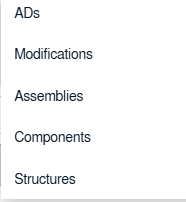 |
| 5. Hover over the CONTROLS dropdown and Click on the Manage Status List option. It will open a new window. |   |
|
6. Once new window will open, Click on the ADD button.
|
 |
| 7. Enter Column Name into text box. |  |
| 8. Select Header and Column Field Type from the list. |   |
| 9. Click on the SAVE button to save new Column. |  |
| 10. If we don�t have any rows in CS then APPLY MASTER button will be active. Click on the APPLY MASTER button. |  |
| 11.Edit/Delete/Reorder column options are also available in this section |   |
| 12. Click on AUDIT TRAIL button. It will open Audit Trail in a new window. |  |