
| 1 | Login to your account using the username and password provided. | |
| 2 | Click on the Fleet Management tab then Hover over the Document Management Centre tab and Click on Manage Master Documentation tab. |  |
| 3 | Select Client and Other relevant details. It will load data into grid. | 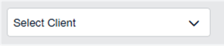 |
| 4 | Go to grid, Select folder/s for which you want to download documents to PC. | 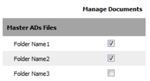 |
| 5 | Go to top right corner and Hover over Manage Document Icon. |  |
| 6 | Click on Download to PC tab. It will start downloading documents to your PC. |  |